
USB Hub Price in Nepal: Complete Buying Guide (2026)
If you’re researching **USB hub price in Nepal** before buying one, you’re in the right place. As laptops keep shrinking their port selection — especially MacBooks, ultrabooks, and modern Windows laptops — a good USB hub has gone from a nice-to-have to a near-essential accessory. Whether you need extra USB-A ports, an HDMI output for a second monitor, an SD card reader, or fast charging passthrough, there’s a hub built for it. At TronixSpace, here’s our complete breakdown to help you pick the right one without overspending.
USB Hub Price in Nepal: Quick Comparison by Brand and Model
| Brand & Model | Type | Ports | Approx. Price (NPR) |
|---|---|---|---|
| UGREEN Revodok | Multiport Docking Hub | HDMI, USB-A, SD, Ethernet, PD | Rs. 7,000 – 13,000 |
| Anker 341 USB-C Hub | USB-C Hub (Compact) | USB-A, HDMI, SD | Rs. 3,500 – 5,500 |
| Baseus 7-in-1 Hub | USB-C Hub (Compact) | USB-A, HDMI, SD, PD | Rs. 3,000 – 6,000 |
| Belkin USB-C Hub | USB-C Hub (Compact) | USB-A, HDMI, PD | Rs. 4,000 – 7,000 |
| Generic USB-A Hub | Basic USB-A Hub | 3-4 USB-A | Rs. 800 – 2,000 |
| Thunderbolt/USB4 Dock (various brands) | Premium Dock | 8+, high-speed data, dual display | Rs. 15,000+ |
Prices are approximate and vary by retailer, port count, and warranty terms — confirm exact USB hub price in Nepal with your authorized seller before purchase.
What Is a USB Hub and Why You Need One
A USB hub is a small device that plugs into a single port on your laptop or PC and expands it into multiple ports. Modern laptops, especially slim ones like the MacBook Air, MacBook Pro, and many Windows ultrabooks, often ship with only one or two USB-C ports — making a hub essential for connecting a mouse, external drive, monitor, and charger all at once without constantly swapping cables.
USB Hub Price in Nepal: Types of USB Hubs Explained
Basic USB-A Hub
The simplest and most affordable option. It takes one USB port and splits it into 3-4 USB-A ports, ideal for desktop users or anyone just needing to plug in a keyboard, mouse, and flash drive simultaneously.
USB-C Hub (Compact)
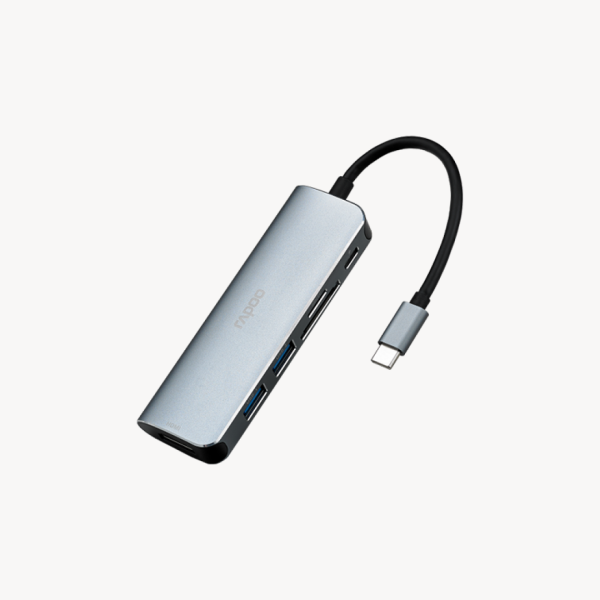
Also commonly searched as a Type-C hub in Nepal, this compact format is built for modern laptops, combining USB-A ports, an HDMI output, and an SD/microSD card reader in a pocket-sized design. They’re the most popular choice for students, professionals, and everyday MacBook or Windows laptop users in Nepal.
Multiport Docking Hub
A step up in capability, offering more ports — often including Ethernet for stable wired internet, multiple HDMI outputs for dual monitors, and Power Delivery (PD) passthrough so your laptop charges while connected. Popular among remote workers and home-office setups.
Thunderbolt/USB4 Dock
The premium tier, offering significantly faster data transfer speeds and support for high-resolution external displays. Best suited for video editors, photographers, and developers working with large files or multi-monitor workflows.
USB-C Hub vs USB-A Hub vs Docking Station
USB-C Hub vs USB-A Hub— USB-C hubs work with modern laptops that have USB-C-only ports and usually support faster data speeds, video output, and charging passthrough. USB-A hubs are simpler, cheaper, and better suited for desktops or older laptops that already have USB-A ports.
USB Hub vs Docking Station — A basic hub adds ports; a docking station goes further by adding power delivery, Ethernet, and often dual display support, essentially turning your laptop into a desktop workstation when connected. If you work from a fixed desk setup, a docking station offers more long-term convenience.
Wired Hub vs Wireless Alternatives — There isn’t really a wireless substitute for a USB hub’s core function (power and stable data transfer), which is why even in 2026, a physical hub remains the most reliable way to expand your ports.
Best USB Hub Brands and USB Hub Price in Nepal
Brand matters more than people expect with USB hubs, since power regulation and build quality directly affect device safety and longevity. Reputable brands and popular models commonly available through authorized retailers in Nepal include:
– UGREEN— wide range from budget USB-A hubs to premium docking stations with Ethernet and PD
-Anker — known for reliable build quality and consistent PD charging performance
– Baseus— competitively priced with solid everyday performance
-Belkin— trusted for MacBook-focused USB-C hubs and docks
-Orico— good mid-range option with strong port variety
-Verbatim— reliable for basic and compact hub options
-TP-Link — mainly known for networking-focused docks with Ethernet support
Sticking to these brands through authorized sellers reduces the risk of overheating, slow charging, or unstable data transfer that’s common with unbranded units. If you’re comparing USB-C hub price in Nepal across these brands, expect the gap to come down mostly to port count, build material, and PD wattage rather than brand name alone.
Which USB Hub Fits Your Laptop?
| Laptop | Recommended Hub |
|---|---|
| MacBook Air | Compact USB-C Hub |
| MacBook Pro | USB-C Hub or Thunderbolt/USB4 Dock |
| Dell XPS | USB-C Hub |
| ASUS Zenbook | USB-C Hub |
| Lenovo ThinkPad | Multiport Docking Hub |
| HP Pavilion | USB-A or USB-C Hub (depending on ports) |
Common Mistakes When Buying a USB Hub
Buying USB-A instead of USB-C— always confirm your laptop’s actual port type before purchasing; the wrong connector simply won’t fit.
Ignoring Power Delivery wattage— a hub rated for 30W PD won’t properly charge a laptop that needs 65W or 100W.
Assuming every hub supports HDMI— not all compact hubs include video output; check the spec sheet, don’t assume.
Assuming every hub supports dual monitors — dual-display output requires a hub specifically built for it, usually a docking hub or Thunderbolt/USB4 dock.
Buying unbranded products without warranty — cheaper unbranded hubs often skip proper power regulation, risking damage to connected devices, and rarely come with any after-sales support.
What to Consider Before Buying
Port Type Compatibility
Check whether your laptop has USB-C, USB-A, or both before buying. Plugging a USB-C hub into a USB-A-only laptop (or vice versa) won’t work without an adapter.
Number and Type of Ports
List what you actually plug in regularly — external monitor, wired mouse, SD card, Ethernet cable — and pick a hub that covers those exact needs rather than overpaying for ports you’ll never use.
Data Transfer Speed
For everyday use (mouse, keyboard, flash drive), basic USB 2.0/3.0 speeds are fine. If you regularly move large video or design files, look for USB 3.1/3.2 or Thunderbolt/USB4 support for noticeably faster transfers.
Power Delivery (PD) Passthrough
If you want to charge your laptop through the hub while also using its other ports, confirm it supports Power Delivery at a wattage matching your laptop’s charger (commonly 60W, 65W, or 100W).
Build Quality and Heat Management
Cheaper hubs can overheat or throttle speeds under heavy use. Look for aluminum or reinforced builds, especially for hubs you’ll use daily for extended work sessions.
Brand and Authenticity
Stick to known brands sold through authorized retailers in Nepal. Cheap unbranded hubs are common in local markets but often cut corners on power regulation, which can risk damaging connected devices.
Best USB Hub Nepal: Our Picks for 2026
Looking for the best USB hub for laptop use in Nepal? Here’s how we’d break down the picks by use case:
Best Value: Basic USB-A Hub — the cheapest way to add extra ports for everyday peripherals on desktops and older laptops.
Best Balance: Compact USB-C Hub — covers HDMI, USB-A, and SD card needs in a pocket-sized form, ideal for MacBook and ultrabook users who want one hub for daily carry.
Best for Power Users: Multiport Docking Hub — adds Ethernet and PD charging for a true desk-setup replacement, especially useful for remote work and dual-monitor setups.
Best Overall: Thunderbolt/USB4 Dock — the fastest, most future-proof option for professionals working with large files, multiple high-resolution displays, or demanding creative workflows.
USB Hub for MacBook Users
MacBooks (especially MacBook Air and 14-inch/16-inch MacBook Pro) are among the most common reasons people in Nepal buy a USB-C hub, since Apple’s port selection is limited. A compact hub with HDMI, USB-A, SD card reader, and PD passthrough covers nearly all daily MacBook needs — connecting an external display, transferring photos, plugging in a mouse, and charging, all through a single port.
Using a USB Hub for Dual Monitor Setups
If you want to connect two external monitors to a single laptop, you’ll need a hub or dock that specifically supports dual HDMI/DisplayPort output — not all hubs do. Multiport docking hubs and Thunderbolt/USB4 docks are generally the safest choice for reliable dual-monitor performance without lag or resolution limits.
Where to Buy USB Hub in Nepal
You can buy genuine USB hubs from authorized computer and electronics stores in Nepal. TronixSpace offers original UGREEN, Baseus, Anker, Belkin, and other premium accessories — including compact USB-C hubs and full USB docking stations — with warranty and nationwide delivery, so you don’t have to rely on unbranded market stalls for something that touches your laptop’s power and data lines daily.
Buying USB Hubs in Nepal
When purchasing a USB hub or **USB docking station price in Nepal** comparison, a little care upfront saves you from compatibility issues and short-lived hardware later. Keep these points in mind:
- Buy from authorized electronics/IT retailers — rather than unbranded stalls, to ensure the hub meets proper power and data specifications.
- Check warranty coverage — reputable hubs typically come with at least 6-12 months warranty; always ask before purchase.
- Confirm wattage support if charging matters to you — undersized PD support can mean slow or no charging for your laptop.
- Ask for a VAT bill — useful for warranty claims and proof of purchase.
- Test before leaving the store if possible — particularly for HDMI output and charging, since these are the most common failure points in cheaper hubs
Frequently Asked Questions
Which USB hub is best for laptops in Nepal?
For most laptop users, a compact USB-C hub with USB-A ports, HDMI output, and an SD card reader covers daily needs well. MacBook and ultrabook users in particular benefit most from this type.
Does a USB hub reduce data transfer speed?
It can, depending on hub quality and how many devices are connected simultaneously. A well-built hub with USB 3.0 or higher support maintains near-full speed; cheaper hubs may bottleneck performance under heavy load.
Can a USB hub charge my laptop?
Yes, if it specifically supports Power Delivery (PD) passthrough at a wattage that matches or exceeds your laptop’s charging requirement. Always check the PD wattage rating before assuming a hub can charge your device.
Is USB-C hub better than USB-A hub?
For modern laptops with USB-C ports, yes — USB-C hubs generally offer faster speeds, video output, and charging support. USB-A hubs remain useful for desktops or older laptops with traditional USB-A ports.
How many ports does a USB hub need?
This depends on your usage. Casual users are usually fine with 4-6 ports, while professionals running dual monitors, Ethernet, and multiple peripherals should look at 7+ port docking hubs.
Is USB hub worth buying in Nepal?
Yes, especially for users with USB-C-only laptops. A genuine, well-built hub from an authorized retailer is a one-time investment that solves connectivity limitations for years.
Final Thoughts
There’s no single “best” USB hub — only the right one for your ports, workflow, and budget. Casual users will do fine with a basic USB-A or compact USB-C hub, while remote workers and dual-monitor setups benefit more from a multiport docking hub. Professionals handling large files or multiple high-resolution displays should prioritize a Thunderbolt/USB4 dock for speed and future-proofing.
Explore the latest USB hub price in Nepal, compare port options, and find genuine accessories at TronixSpace. Whether you’re a student, remote worker, or creative professional, our team can help you choose the right hub for your exact setup.
You might also find these guides useful:
- Apple iPad Price in Nepal
- MacBook Buying Guide
- Laptop Accessories Guide
- Monitor Price in Napal
- USB-C Cable Guide
- Laptop Stand Guide
- External Monitor Guide
- External SSD and Storage Guide
- Wireless Mouse and Keyboard Guide